
Realtime dashboards
See who is on your site right now, where they came from and what they just did.
37visitors online
- pageview/pricingDEnow
- signup_click/pricingUS3s
- pageview/docs/getting-startedJP7s
- checkout_start/checkoutFR12s
Traffic, funnels, session replay, feature flags, errors and LLM costs in one place. One script tag or your existing PostHog SDKs, no cookies, and the data stays yours.
Measure traffic, find drop-off, watch sessions, ship behind flags and fix errors without stitching five tools together.
See who is on your site right now, where they came from and what they just did.
37visitors online
Find the exact step where people drop off.
Weekly cohorts show who keeps coming back.
Weekly cohorts, % of users returning
rrweb recordings in your R2 bucket, with masking and sampling.
Roll out gradually, target users and measure the impact.
new-checkout50% rolloutpricing-page-v2100% rolloutai-summariesOffExceptions grouped into issues and linked to the sessions that hit them.
| Issue | Events | Users |
|---|---|---|
| TypeError | 128 | 34 |
| ChunkLoadError | 41 | 19 |
| UnhandledRejection | 12 | 5 |
Every part runs on Cloudflare. On Cloud we operate it for you. Self-hosted, all of it lives in your account.
Paste the snippet into your site. Pageviews, SPA navigation and errors start flowing right away.
<script defer src="https://analytics-t.ai-ugc-video.com/script.js"
data-website-id="YOUR_WEBSITE_ID"></script>An ingest Worker validates each event, Queues absorb traffic spikes, and an aggregator writes each website’s events and rollups to its own SQLite store on Durable Objects.
Explore dashboards and reports, share read-only links, and send scheduled email reports to your team.
Cloudflare account
Lightweight measurement that respects visitors, and data you can actually reach.
See comparisonsNo cross-site tracking and no stored IP addresses. Events belong to your site only.
The tracker sets no cookies, which means fewer consent prompts and cleaner pages.
Export CSV, query your events with SQL or delete data at any time. Each website’s data lives in its own store; self-host for full control.
Analytics, replay, flags, surveys, errors, logs and LLM traces share one script and one dashboard.
Start free with core analytics. Upgrade to Cloud for replay, heatmaps, teams and more event volume, choose Business for larger allowances, or run it yourself.
Free tier
$0per month
Core product analytics for one site at no cost.
Recommended
Paid plan
$19per month
Replay, heatmaps, unlimited websites, and a higher monthly event pool.
Paid plan
$99per month
Larger allowances and longer raw data retention for high-traffic products.
Self-host
$0for non-commercial use
The full product on your own Cloudflare account.
Running Flareboard commercially on your own infrastructure? We offer licenses, deployment help and support.
By default Flareboard sets no cookies and never stores IP addresses; visitors are counted with a hash that resets every month. If you turn on “Remember visitors across sessions”, a random visitor id is kept in localStorage. Whether you need a consent banner still depends on where you operate, the settings you choose and the other tools your site uses.
The tracker is about 12 KB gzipped, loads with defer and sends events with keepalive requests, so it stays off your critical rendering path.
Yes. The same code deploys to your Cloudflare account using Workers, Durable Objects, D1, R2, KV, Queues and Workflows. Self-hosting is free for non-commercial use; commercial use needs a license.
On the Cloud plan you can import pageview history from GA4, Plausible, Matomo or Flareboard CSV exports.
On Flareboard Cloud, each website’s events live in its own SQLite store on Cloudflare Durable Objects, account settings in D1 and session recordings in R2, all run by us on Cloudflare. When you self-host, everything stays in your own Cloudflare account.
Yes. Point posthog-js, posthog-node or posthog-python at your Flareboard ingest host and use the website’s project key (fb_pk_…). Events, identify, groups, feature flags and exceptions work as before; session recording and surveys use Flareboard’s own tracker.
Yes, through Flareboard’s MCP server. Connect Claude, Cursor or any MCP client with a personal API key to list events, run trends, funnels and retention, and query data with read-only SQL. Keys with the write scope can also add annotations and toggle feature flags.
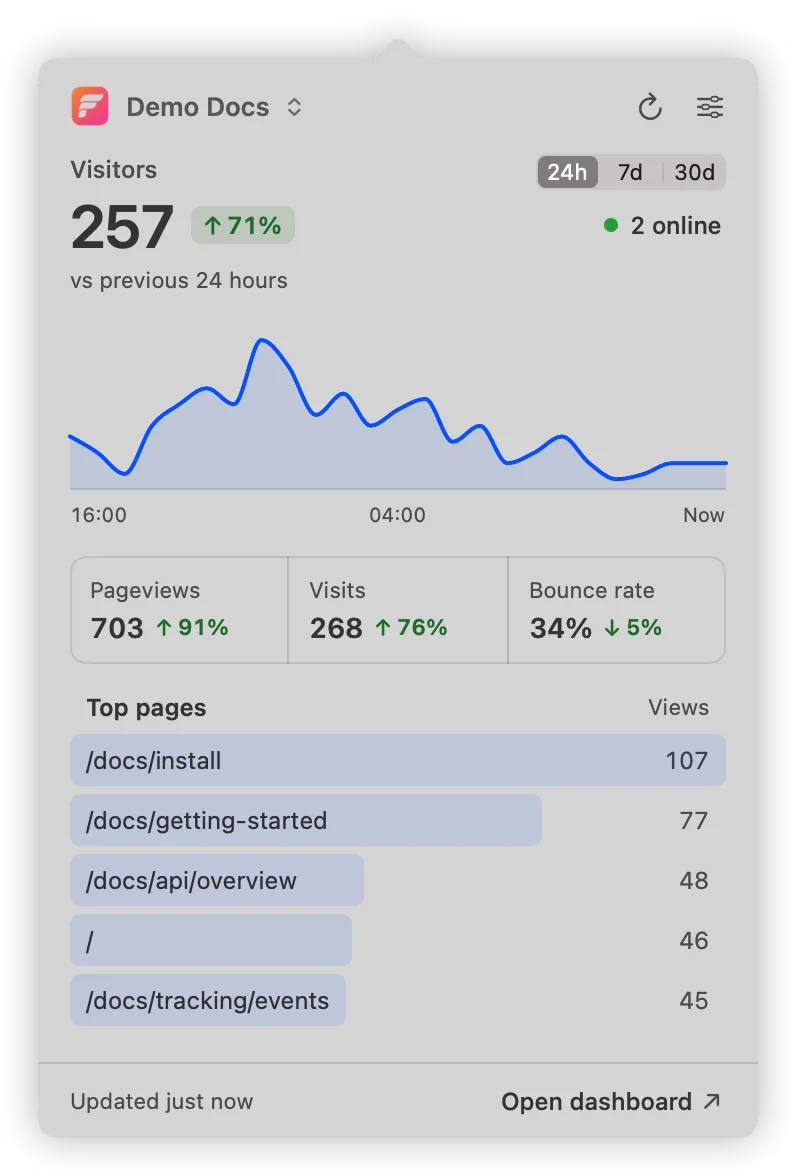
Flareboard for Mac
A small native app that shows how many people are on your site right now, next to the clock.
Free · 1.8 MB · macOS 14 or later · Apple silicon and Intel
Create an account, add your site and paste one script. It takes a few minutes.
 Flareboard for Mac